01 Copilot governance, made visible
What can Copilot actually reach?
Start with the source. Follow the permissions, the agent and the evidence.
Let’s follow one file.
02 Start with the risk
Broad access becomes easy discovery.
For user-scoped Microsoft 365 retrieval, broad permissions can make existing data easier to find.
03 Follow the request
The permission check is on the path.
A simplified view of built-in, user-scoped Microsoft 365 retrieval.
A signed-in user asks a question. This diagram stays within the built-in Microsoft 365 retrieval path.
05 Find the review queue
Start with the sites that need a look.
Use SharePoint Advanced Management to prioritise an owner-led review.
Everyone except external users
Broad sharing link
Broken inheritance
- Find
- Owner review
- Right-size
- Recheck
Illustrative risk factors only. These are not scanned results.
Check the licence boundary
One assigned qualifying Copilot licence plus the required base licence unlocks documented included SAM features, not all SAM capabilities. Check SAM Plan 1 exceptions and E5 requirements for sensitivity-label reports.
06 Two controls, two jobs
Hide discovery? Or restrict access?
Look at the setting, then ask which route it controls.
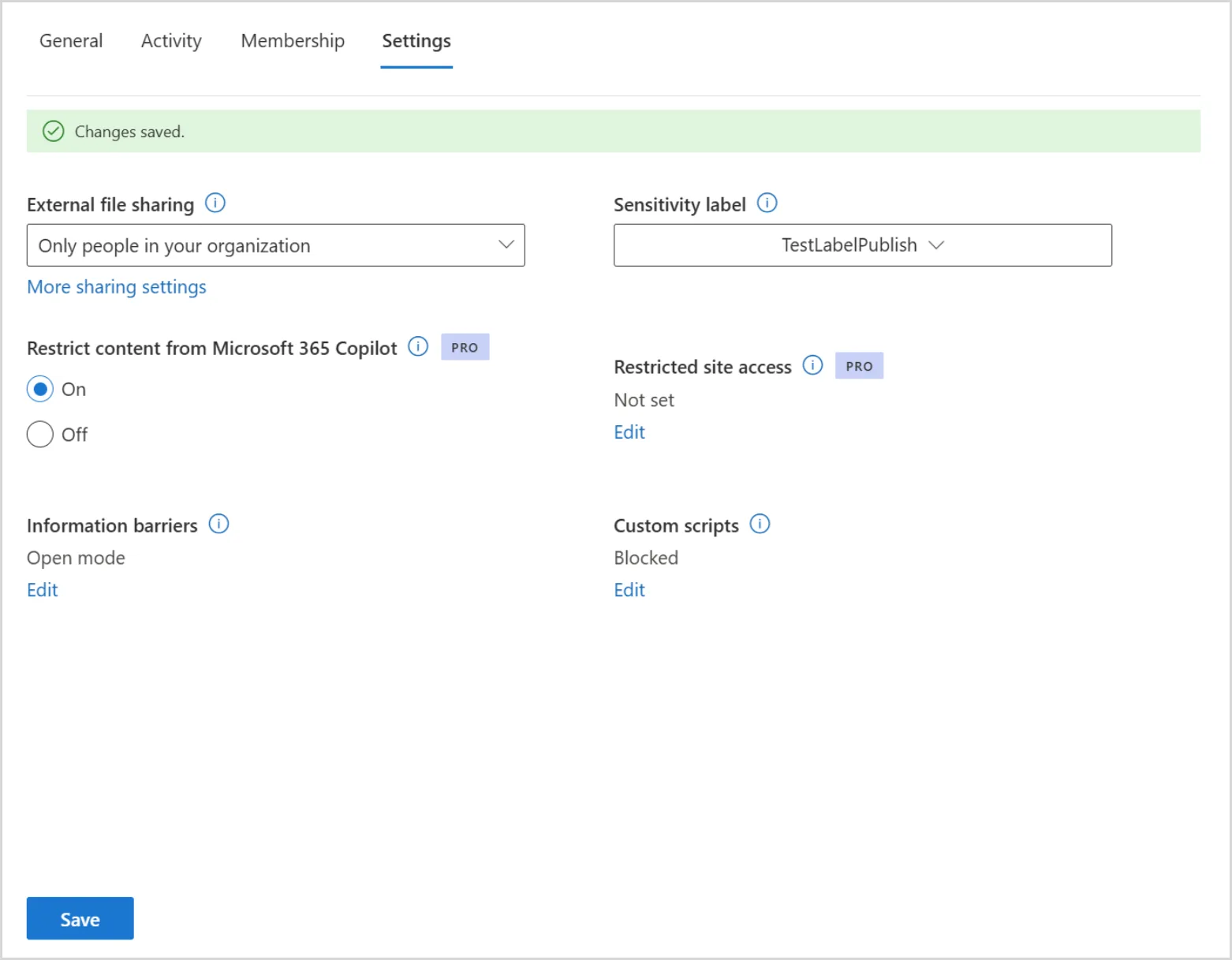
This hides discovery.
The file can still open.
07 The label is the starting point
“Confidential” is not the whole answer.
Check the container setting, item rights and DLP action separately.
Set the collaboration boundary
A site label does not label every file inside it.Apply a label and usage rights
Read and extraction rights affect supported processing.Apply the configured policy action
Check conditions, scope and the Copilot surface.08 Be precise about DLP
What exactly are we blocking?
Simulation, labelled content and sensitive prompts are different policy questions.
See matches before enforcement
Simulation lets you review policy matches without blocking the interaction.
Use the evidence to tune scope and conditions before turning on enforcement.
A separate action: block external web search for matching sensitive prompts while permitted internal grounding can continue.
09 Which agent are we discussing?
The chat window is only the front door.
Microsoft 365 Copilot can host both approaches. The engine and connected services still matter.
Can host both approaches
Declarative
Microsoft 365 Copilot orchestration
- Define instructions and knowledge
- Review tools and configured access
Custom-engine
Your configured orchestration
- Build with Studio / Foundry
- Review models, tools and services
10 Follow the authority
Who owns this connection?
The person asking and the identity doing the work can differ.
Authority to inspect
The user’s granted scope
The tool acts through the signed-in user’s delegated connection. Downstream permissions and authorisation still matter.
Check connection owner, permissions, downstream authorisation and destination.
11 Before you publish
An owner at every gate.
Keep source access, agent audience and tool connections separate.
- 01Environment + maker
Agree where it can be built and who can build it.
- 02Sources + connectors
Approve source scope, connections and destinations.
- 03Publish + audience
Validate channel controls and separate sharing grants.
- 04Owner + monitoring
Keep an inventory. Know the coverage gaps.
- 05Retire + verify
Revoke the relevant agent, source and connection paths.
Registry coverage depends on platform integration. An empty findings list does not prove an agent is clean.
12 Read the evidence
An event is not the conversation.
Audit can connect the user, host and resources. Full prompt and response text needs a separate route.
OperationCopilotInteraction
UserFictional pilot user
AppHostMicrosoft 365 Copilot
Resource referencedemo-resource-01
Message referencedemo-message-01
Who initiated the activity? Check the recorded user identity within the supported event.
Full prompt and response
Not in the standard audit event.
13 Then read the content
This is the content view.
Published, redacted August lab evidence. Select a crop to read the prompt, response or files.
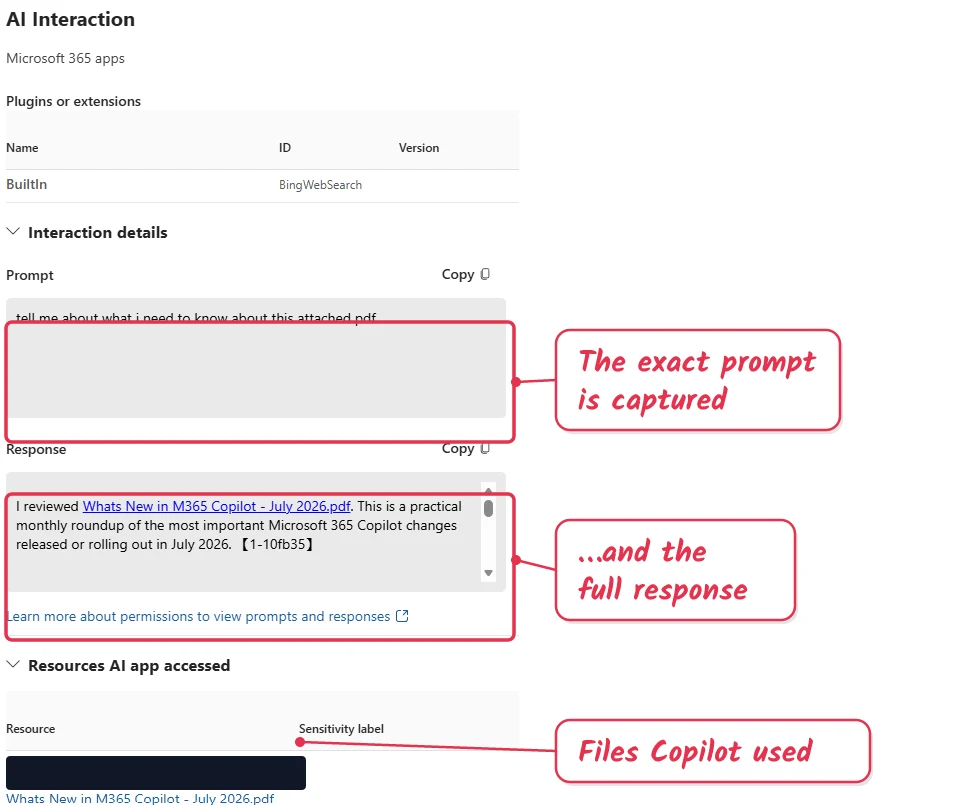
The prompt, with the original lab annotation. Content is cropped for readability, not changed.
14 Respond deliberately
Contain the path. Keep the evidence.
Investigate what happened before deciding what to remove.
- 01
Preserve evidence
Keep relevant events and content through authorised processes.
- 02
Contain the path
Review source access, agent audience and tool connections.
- 03
Investigate actual scope
Establish what was reached, copied, shared or acted on.
- 04
Remediate + retest
Correct the grants and policies. Verify allowed and denied cases.
Keep what explains it.
15 Make a bounded decision
What must be true before the pilot?
A discussion checklist. A checked box does not make a tenant ready.
0 of 6 discussion gates marked. Evidence still needs review.
Changing this checklist does not change your tenant.
16 The next conversation
A small pilot. Evidence we can check.
Agree the audience, an owner and a review date.
Microsoft Learn reference desk
Carry these caveats into the room
RCD docs currently conflict on recently interacted files. Test the exact route.
Restricted SharePoint Search new enablement was blocked from 31 July 2026. It is not a new rollout recommendation here.
Roles, licences, channels and rollout vary. Validate the target tenant.